
Tractor GPS - GLandNav: A Comprehensive Review
Screenshots


Introduction
Tractor GPS - GLandNav is an innovative mobile application designed specifically for modern farming needs. Developed by 4Digsoft, this app offers a powerful yet user-friendly tractor GPS guidance system that caters to both novice and professional farmers. With GLandNav, users can efficiently manage their agricultural tasks such as planting, spraying, tilling, and harvesting, all from the convenience of their smartphones. The app eliminates the necessity for expensive hardware and a steep learning curve, making precision farming accessible to everyone. Whether you are managing a small plot or a vast field, GLandNav provides the tools to enhance your fieldwork accuracy and efficiency.
Graphics & Gameplay
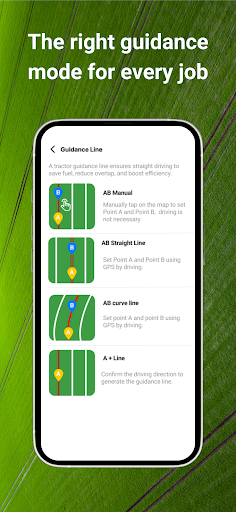
The visuals of GLandNav are designed with clarity and functionality in mind. The screenshots depict a clean and intuitive user interface that emphasizes ease of navigation. Users will find vibrant, easy-to-read maps and guidance lines that assist in maintaining the right path during field operations. The app showcases various navigation modes, including straight lines, curves, and freeform paths, ensuring that users can select the best option for their specific field layout. The visual guidance system is particularly impressive, providing real-time feedback to help avoid skips and overlaps, which is crucial for maximizing efficiency in farming tasks.
Additional graphics highlight the app's capability to import field boundaries through various formats like SHP, KMZ, KML, or GeoJSON, making it convenient to set up and operate. Overall, the aesthetic of GLandNav is both practical and visually appealing, ensuring that users can navigate their fields with confidence and ease.
Key Features
- Multiple Navigation Modes: Navigate using straight lines, curved lines, A+ lines, or free mode to suit various farming operations.
- Visual Guidance: The app provides clear visual cues to help users stay on track, minimizing the risk of overlapping or missing sections of the field.
- Task Versatility: Designed to support a wide range of agricultural tasks, including planting, tilling, and spraying.
- Data Import: Instantly import field boundaries in formats such as SHP, KMZ, KML, or GeoJSON for seamless setup.
- Area Measurement: Measure field areas directly via GPS or through manual input, ensuring accurate land assessments.
- Automatic Record Saving: Navigation records are saved automatically, allowing for easy reuse in future operations.
- Cross-Platform Sync: New feature supports data synchronization across up to 10 devices, facilitating collaborative farm management.
- Cost-Effective Farming: Designed to reduce fuel consumption and minimize input waste, ultimately enhancing crop efficiency.
Mod Features
While the standard version of GLandNav is already impressive, some users may seek enhanced experiences through mod features. Here are some plausible mod features one might find:
- Premium Unlocked: Access all premium features of the app without paying a subscription fee, allowing for an enhanced user experience with advanced functionalities.
- No Ads: Enjoy an uninterrupted navigation experience without any advertisements, making the app more user-friendly and focused on the task at hand.
- Unlimited Money: Gain unlimited resources for additional features or tools within the app, empowering users to maximize their farming strategies.
- Enhanced GPS Accuracy: Improved GPS algorithms for pinpoint accuracy, ensuring that every inch of your field is utilized efficiently.
- Customizable Themes: Personalize the app's interface with various themes to create a more enjoyable user experience.
How to Install APK on Android
Installing the GLandNav APK on your Android device is a straightforward process. Follow these steps for a smooth installation:
- Enable Unknown Sources: Go to your phone's Settings, navigate to Security, and enable 'Install from Unknown Sources' to allow installations from sources other than the Google Play Store.
- Download the APK: Visit the official GLandNav page at this link to download the latest version of the APK file.
- Locate the File: Once downloaded, open your file manager and locate the downloaded APK file (usually in the 'Downloads' folder).
- Install: Tap on the APK file to begin the installation process. Follow the on-screen prompts to complete the installation.
- Open the App: Once installed, you can find GLandNav in your app drawer. Open the app and start exploring the features.
Conclusion & Call to Action
Tractor GPS - GLandNav is an essential tool for any modern farmer looking to enhance their efficiency and accuracy in fieldwork. With its user-friendly interface, versatile navigation options, and robust features, it stands out as one of the leading applications in the precision farming sector. Whether you're a beginner or a seasoned professional, GLandNav can greatly improve your farming operations.
Ready to take control of your fieldwork? Download GLandNav today and experience the benefits of precision farming right at your fingertips by visiting this link.