
Screenshots

Introduction
Shinobi Warfare is an engaging mobile game developed by TechnoTal, designed for players who have a penchant for action, strategy, and customization. In this immersive experience, users can create and personalize their own shinobi characters, enhancing their skills, weapons, and accessories to compete in various multiplayer game modes. The game focuses on dynamic interactions between players, featuring modes such as Clan Wars, Arena battles, and Player versus Player (PVP) encounters. With version 1.070, Shinobi Warfare aims to provide an exciting blend of tactical gameplay and competitive spirit, attracting fans of the shinobi genre.
Graphics & Gameplay
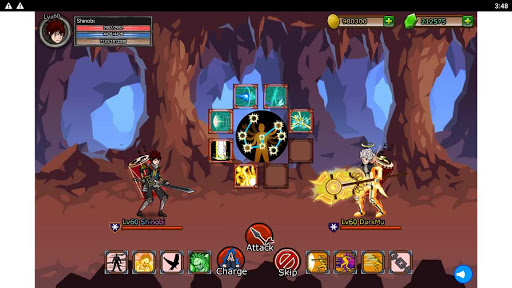
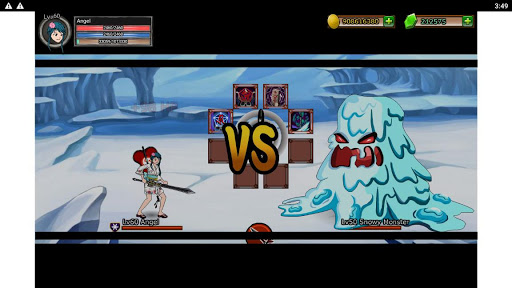
The visuals of Shinobi Warfare are vibrant and dynamic, effectively capturing the essence of the shinobi theme. The character designs are intricate, showcasing various costumes and weaponry that highlight the uniqueness of each player's shinobi. The environments are richly detailed, featuring various battlefields that enhance the overall gameplay experience. Players can expect well-rendered animations that bring the action to life, creating an engaging atmosphere that keeps them glued to their screens.
From the screenshots, it is evident that the game emphasizes a colorful art style, with smooth character movements and striking special effects during battles. The user interface is intuitive, allowing players to navigate through different menus with ease, whether they are customizing their character or joining a multiplayer match. The gameplay mechanics appear to be fluid, making it accessible for both new players and seasoned veterans of action games.
Key Features
- Character Customization: Players can create and modify their shinobi, selecting from a wide array of skills, weapons, and accessories to tailor their combat style.
- Multiplayer Game Modes: Engage in various competitive modes including Clan Wars, Arena battles, and PVP to prove your skills against other players.
- Skill Development: Level up your shinobi by improving skills and unlocking new abilities as you progress through the game.
- Interactive Environments: Experience diverse battlefields that add strategic depth to gameplay, requiring players to adapt their tactics based on the surroundings.
- Daily Challenges: Complete objectives and challenges that refresh daily for additional rewards and to keep gameplay exciting.
- Social Features: Connect with friends and other players, join clans, and participate in cooperative events for a more immersive experience.
Mod Features
For those looking to enhance their Shinobi Warfare experience, several mod features can be imagined to elevate the gameplay. These include:
- Premium Unlocked: Gain access to exclusive content and features that usually require in-game purchases, allowing you to enjoy the full array of customization options without spending extra.
- No Ads: Enjoy uninterrupted gameplay by eliminating all advertisements, enhancing the immersive experience as you battle against other players.
- Unlimited Money: Acquire endless resources to purchase the best weapons, skills, and accessories without grinding for coins or spending real money.
- Instant Level Up: Skip the grind and instantly level up your shinobi to experience the game at its fullest potential right from the start.
- Enhanced Graphics: Unlock enhanced visual settings for a more breathtaking experience with crisper graphics and smoother animations.
How to Install APK on Android
Installing the Shinobi Warfare APK on your Android device is a straightforward process. Follow these steps to get started:
- Download the APK: Click on the download link provided at the end of this guide. Ensure you have a stable internet connection for a smooth download.
- Enable Unknown Sources: Before installing the APK, go to your device's Settings > Security, and enable the option to install apps from unknown sources. This allows you to install applications outside of the Google Play Store.
- Locate the APK File: Once the download is complete, navigate to your device’s File Manager, and find the downloaded APK file, usually located in the 'Downloads' folder.
- Install the APK: Tap on the APK file to initiate the installation process. Follow the prompts and wait for the installation to complete.
- Launch the Game: After installation, find Shinobi Warfare in your app drawer and tap to launch. You can now start customizing your shinobi and dive into the action!
Conclusion
Shinobi Warfare offers a robust and engaging experience for fans of action and strategy games. With its diverse customization options, thrilling multiplayer modes, and stunning visuals, players are sure to find a rewarding gaming experience. If you’re ready to create your own shinobi and challenge others, don’t hesitate to download the game today!
Download Shinobi Warfare now: Click here to download