
Fuel Insight: The Ultimate Fuel Management App
Screenshots



Introduction
Fuel Insight is a comprehensive application designed to help vehicle owners manage their refueling history, mileage, running costs, and Fuel Pass details. Developed by Md. Golam Mawla, this app provides a clean and user-friendly interface that makes tracking and managing fuel-related data an effortless task. With features that allow users to log every fill-up, monitor odometer readings, calculate fuel efficiency, and review both monthly and yearly fuel expenditures, Fuel Insight is an essential tool for anyone looking to keep a close eye on their fuel consumption and costs. Additionally, the app allows users to store their Fuel Pass QR codes and set monthly limits to manage fuel allowances effectively.
Graphics & Gameplay
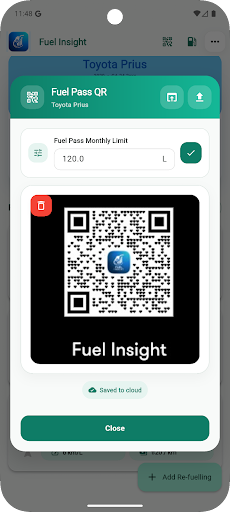
The visual design of Fuel Insight stands out with its clean and intuitive layout. The screenshots depict a well-organized user interface with a combination of vibrant colors and easy-to-read fonts. The main dashboard features clear navigation options that allow users to access different functions with minimal effort. Graphical representations of fuel history, costs, and mileage are presented in a way that makes the data easy to digest at a glance. The app also supports dark and custom themes, catering to user preferences and enhancing the overall user experience. Whether you are logging a new refueling record or reviewing your monthly statistics, the visuals are designed to make the process as seamless as possible.
Key Features
- Add and Manage Refueling Records: Users can easily add new fuel entries and manage their refueling history.
- Track Mileage and Average km/L: The app calculates average fuel consumption, helping users assess their vehicle's performance.
- Calculate Fuel Cost per Kilometer: Fuel Insight provides insights into the cost-effectiveness of driving habits.
- Monthly and Yearly Fuel History: Users can review detailed fuel expenditure over time, facilitating budgeting and financial planning.
- Excel Import: Easily import existing refueling records from Excel files for quick setup.
- Store Fuel Pass QR: Quick access to Fuel Pass QR codes for convenience during refueling.
- Monthly Fuel Pass Limit: Users can set limits to track remaining fuel allowances for the month.
- Manage Multiple Vehicles: Perfect for families or businesses with more than one vehicle.
- Secure Sync Across Devices: Share your fuel data securely across multiple devices for accessibility.
- Custom Themes: Personalize the app's appearance with dark and custom themes.
Mod Features
While Fuel Insight is feature-rich in its standard version, a modified version could enhance the user experience even further. Here are some creatively imagined mod features:
- Premium Unlocked: Access all premium features without any additional payment, including advanced analytics and insights.
- No Ads: Enjoy an uninterrupted experience with all ads removed, allowing for a more focused approach to managing fuel data.
- Unlimited Money: Utilize an unlimited budget for fuel tracking, giving users the freedom to log expenses without worrying about costs.
- Custom Analytics: Get detailed reports and graphical representations of fuel usage trends over various time frames, enhancing financial decision-making.
- Fuel Tips & Tricks: Receive personalized fuel-saving tips based on user data and driving patterns to help minimize costs.
How to Install APK on Android
Installing the Fuel Insight APK on your Android device is a straightforward process. Follow these simple steps to get started:
- Enable Unknown Sources: Go to your device's Settings, then navigate to Security (or Privacy) and enable Unknown Sources to allow installations from sources outside the Google Play Store.
- Download the APK: Click on the following link to download the Fuel Insight APK: Download Fuel Insight.
- Locate the File: Once downloaded, open your file manager and navigate to the Downloads folder to find the APK file.
- Install the APK: Tap on the APK file and follow the on-screen instructions to install the app.
- Open Fuel Insight: After installation, locate the app icon in your app drawer and open it to start managing your fuel data.
Call to Action
If you are looking for an efficient way to manage your vehicle's fuel consumption and costs, Fuel Insight is the perfect app for you. With its user-friendly interface and robust features, it ensures that you stay informed about your fuel usage. Don't wait any longer; download Fuel Insight today and take control of your vehicle's fuel management!